Audit
The history of everything that changes a miner or the configuration, takes data off the Pi or scans the network, whether from the dashboard or by the app itself (scheduler, nightly backup).
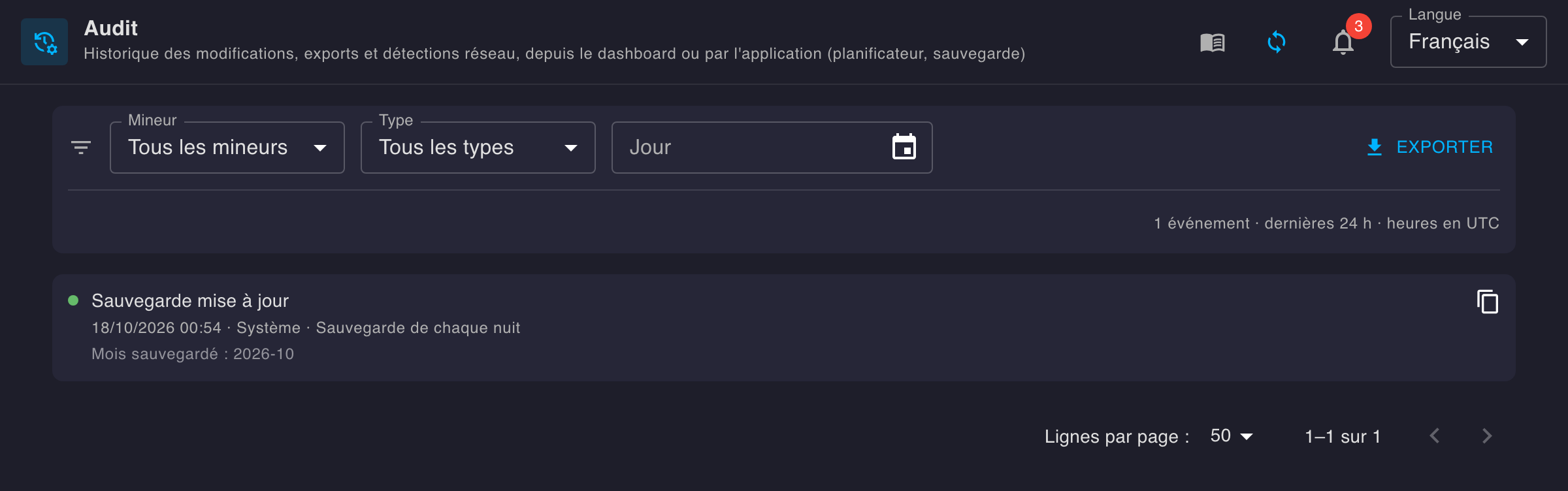
The page shows the last 24 hours by default, newest first. The calendar shows another day, from midnight to midnight UTC. Times are in UTC, like Backups and the audit report mail: an event carries the same time everywhere.
- Filters — by miner, by event type and by day. Each active filter shows up as a chip below the bar: its cross removes it, Clear all removes them all. The period’s event count is shown on the right.
- One row per event — a green dot if the operation succeeded, red if it failed, followed by the event type and the miner involved. Below:
- for an operation made from the dashboard: the time, the device’s IP address and browser (full details on hover);
- for a scheduler operation: the time and the cron expression that triggered it;
- for the nightly backup: the time and the month updated;
- on failure, the error code and message.
- Copy — the icon at the end of the row copies the full entry, as JSON.
- Export — downloads every entry of the current period and filters (not just the page shown) as a JSON file.
📋 Recorded events
The audit traces what was done through the tool: by someone in the dashboard, or by the app itself (its scheduler, its nightly backup). Each entry says what (the type), when, who (the device’s IP and browser, or the scheduler and its job), on what (the miner) and with which result (success, or failure with its error message). A failed action is recorded too.
⚙️ Miner actions
| Type | Label | From | What the entry holds |
|---|---|---|---|
restart | Restart | a miner's panel › Restart; or a scheduler job | the restarted miner |
switch_primary | Switch to primary pool | a miner's panel › Switch pool; or a scheduler job | the switched miner — all miners when the switch targets them all (direct API call) |
switch_fallback | Switch to fallback pool | same | same |
🛠️ Configuration
| Type | Label | From | What the entry holds |
|---|---|---|---|
save_miners | Miners saved | Settings page: save discovered miners, enable / disable, disable all, alias, pools, schedule | per changed miner, what changed outside sensitive changes: alias, hostname, model (before → after). On failure: a single entry, with no miner |
save_settings | Settings saved | Settings page › App settings: rate, other devices, pool dashboards, remote | what changed outside sensitive changes: the rate (before → after), the other devices, pool dashboards and firmware repos added or removed. On failure: a single entry |
📤 Data and network
| Type | Label | From | What the entry holds |
|---|---|---|---|
export_audit | Audit export | Audit page › Export | the exported period and filters |
download_backups | Backups download | Backups page › Download | the months downloaded |
discover | Network discovery | Settings page › Automatic detection (network scan, or add by IP) | the scanned range or the probed IP |
backup | Backup updated | every night, by the app: the completed day is added to its month's archive (see Backups) | the month(s) whose archive was updated |
audit_report | Audit report sent | at night, by the mailer, at the frequency chosen in Settings › Notifications | the period covered and the recipients; the error if it failed |
🔐 Sensitive changes
A configuration save that holds sensitive changes produces, instead of save_miners or save_settings, one dedicated entry per sensitive change: one entry per fact, no duplicate line. Each comes with its detail (values before → after, or the job added or removed), so it can be searched for directly. One save can produce several (e.g. a miner’s pool and its schedule).
| Type | Label | When | Detail |
|---|---|---|---|
miner_pool | Miner pool changed | a miner's primary or fallback pool URL, port or user changes | each changed field — e.g. Fallback user: bc1q…abc.w1 → bc1q…xyz.w1 |
miner_schedule | Schedule changed | a scheduled job is added or removed (a job is never edited: changing one is removing it and adding another) | each job added or removed, spelled out — e.g. Job added: Restart · At 12:00 AM, only on Wednesday (0 0 0 * * WED) |
miner_identity | Miner IP changed | an already configured miner's IP changes (the miner is matched by its MAC) | the old and new IP |
miner_disabled / miner_enabled | Miner disabled / enabled | a miner is disabled (no longer monitored nor scheduled) or re-enabled | — |
miner_added | Miner added | a miner joins the configuration | its pools (URL, port, user) and its scheduled jobs |
remote_push | Remote push changed | the hashboard push URL or API key changes | the URL before and after; the API key is never written down, only "changed" |
mail_settings | Notifications changed | the SMTP server or the mail recipients change | each server field before and after, the recipients added or removed; the password is never written down, only "changed" |
The rest of a save (alias, hostname, model, rate, devices, pool dashboards, firmware repos) is detailed under save_miners / save_settings: each fact is written once, under one type. A save that changes nothing isn’t recorded.
🔎 Entry contents
An operation made from the dashboard:
{
  "ts": "2026-10-10T07:57:41Z",
  "source": "api",
  "type": "restart",
  "target": "192.168.1.65",
  "ip": "192.168.1.20",
  "userAgent": "Mozilla/5.0 (Macintosh; Intel Mac OS X 10_15_7) AppleWebKit/537.36 (KHTML, like Gecko) Chrome/154.0.0.0 Safari/537.36",
  "requestId": "raspberrypi/xzGLtihnkN-000057",
  "status": 204
}
A scheduler operation, here a failed one:
{
  "ts": "2026-10-09T21:59:59Z",
  "source": "system",
  "service": "scheduler",
  "type": "switch_fallback",
  "target": "192.168.1.65",
  "cron": "59 59 23 * * FRI",
  "error": "switch pool for 192.168.1.65: … connect: connection refused"
}
| Field | Contents |
|---|---|
ts | Date and time, in UTC |
source | api (from the dashboard) or system (by the app itself) |
type | The event type — see the table above |
target | The IP of the miner involved — absent for a configuration save or a switch on every miner |
ip | api — the IP address of the device that made the request |
userAgent | api — that device's browser |
requestId | api — the request's ID, the same as in the dashboard's logs |
status | api — the response's HTTP code (400 or more: failure) |
query | api — the request's parameters: the months downloaded, the exported period and filters, the targeted miner… |
service | system — the part of the app that acted: scheduler, backup (nightly backup) or mailer |
cron | system — the cron expression that triggered the operation |
error | The error message, on failure |
changes | What changed — each field with its kind (kind): changed (value before → after), or a list item added (after) or removed (before) |
🗄️ Storage and API
Entries are appended to one file per day (UTC): {dataDir}/data/audit/YYYY-MM-DD.jsonl (./storage/data/audit/ with Docker), one JSON entry per line.
Three API routes expose them:
GET /api/audit— the entries betweenfromandto(RFC 3339 dates, the last 24 hours by default, a year at most), filterable byip(miner) andtype, paginated withpageandpageSize.GET /api/audit/types— every type, in the order the dashboard offers them: the valuestypeaccepts.GET /api/audit/export— same parameters, unpaginated: the Export button’s JSON file, which states the period and filters before the list of entries.
{
  "from": "2026-10-09T08:00:00Z",
  "to": "2026-10-10T08:00:00Z",
  "type": "restart",
  "exportedAt": "2026-10-10T08:00:00Z",
  "total": 6,
  "entries": [ … ]
}
The response of GET /api/audit/types — each type is explained in Recorded events:
{
  "types": [
    "restart",
    "switch_primary",
    "switch_fallback",
    "save_miners",
    "save_settings",
    "export_audit",
    "download_backups",
    "discover",
    "backup",
    "audit_report",
    "miner_pool",
    "miner_schedule",
    "miner_identity",
    "miner_disabled",
    "miner_enabled",
    "miner_added",
    "remote_push",
    "mail_settings"
  ]
}
Parameter details are on the API page.
🙈 Hide the page
The page and its menu entry can be hidden from dashboard.yml (dashboard restart needed). The dashboard keeps recording events.
ui:
  page:
    audit: hidden   # enabled (default) | hidden